
Run three agents at once
In this tutorial you give three agents three jobs on the same repo at the same time. One of them stops to ask you a question, which you answer from your phone while the other two keep working. Then you merge them in whatever order they finish, and watch an agent resolve the conflict two of them cause. It takes about 15 minutes.
What you will have
Section titled “What you will have”- Three tickets that ran side by side on
hello-rev0, each on its own branch and worktree. - A question answered from your phone, with one tap.
- All three branches merged, including one whose merge conflict an agent resolved for you.
You need the board and the hello-rev0 repo from
Your first finished ticket, with hello-rev0 as the board’s
Default working directory. To answer from your phone, the phone must reach the board: follow
Reach the board from your phone first, or use a second browser window
instead.
1. Write three tickets
Section titled “1. Write three tickets”Each ticket below uses Auto (agent executes freely), the Developer profile’s default mode, so it starts as soon as you create it. Click Create for each one, fill in Summary and Description, leave the other fields as they are, and click Create.
- Summary:
Add a Usage section to the READMEDescription:Append a short "Usage" section at the end of README.md explaining that this repo is only for trying rev0. - Summary:
Add a Contributing section to the READMEDescription:Append a short "Contributing" section at the end of README.md saying that agents open every change as a ticket. - Summary:
Add a .gitignoreDescription:Before you write anything, ask me which language this repo will use, offering Python, Node and Go as choices. Then add a .gitignore for it.
The first two both append to the end of README.md, on purpose: that is the conflict you will
watch get resolved.
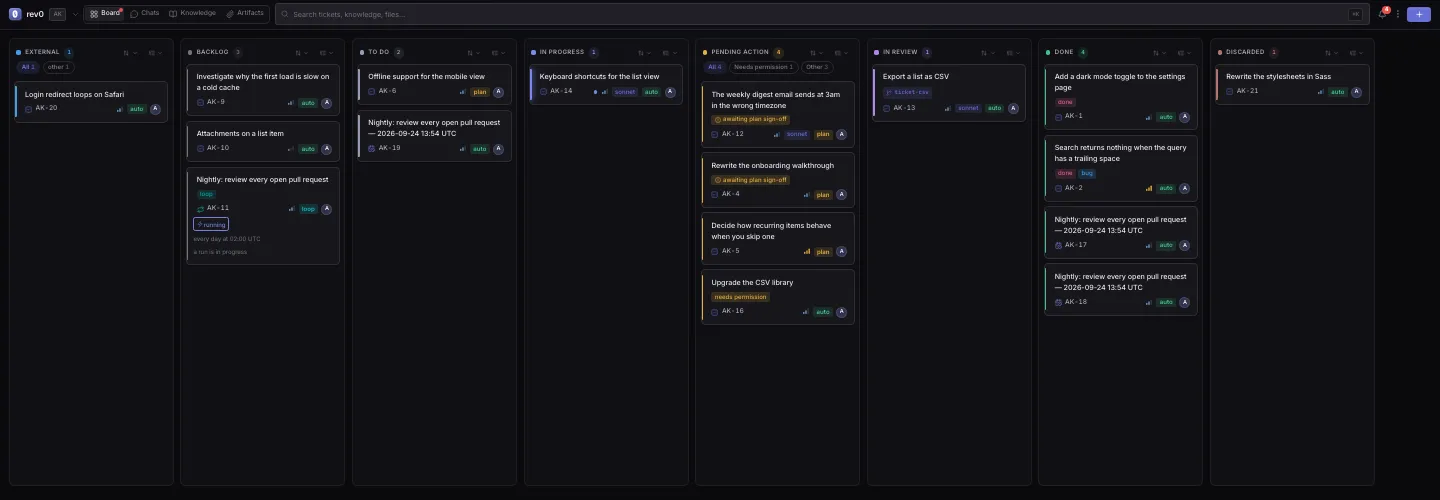
Result: three cards in To Do, claimed within seconds. After setup the board runs up to 8 agents at once (Max concurrent agents in Settings > Workspace > Board), so all three move to In Progress together.
2. Watch them work side by side
Section titled “2. Watch them work side by side”Open each card in turn. Git integration shows three different branches, agent/ticket-<id>,
each in its own worktree. In a terminal:
cd hello-rev0git worktree listResult: your own checkout, plus one worktree per running ticket in
hello-rev0.agent_worktrees/. Each agent edits its own copy, so none of them sees another’s
half-written files, and your checkout stays exactly as you left it.
3. Answer a question from your phone
Section titled “3. Answer a question from your phone”The .gitignore agent reads the repo, then asks its question. Its card moves to
Pending Action, and if you allowed notifications, your devices get one.
- On your phone, open the board and tap the card in Pending Action.
- Under Agent asked a question, tap Answer question.
- Tap Python, then Send answer.
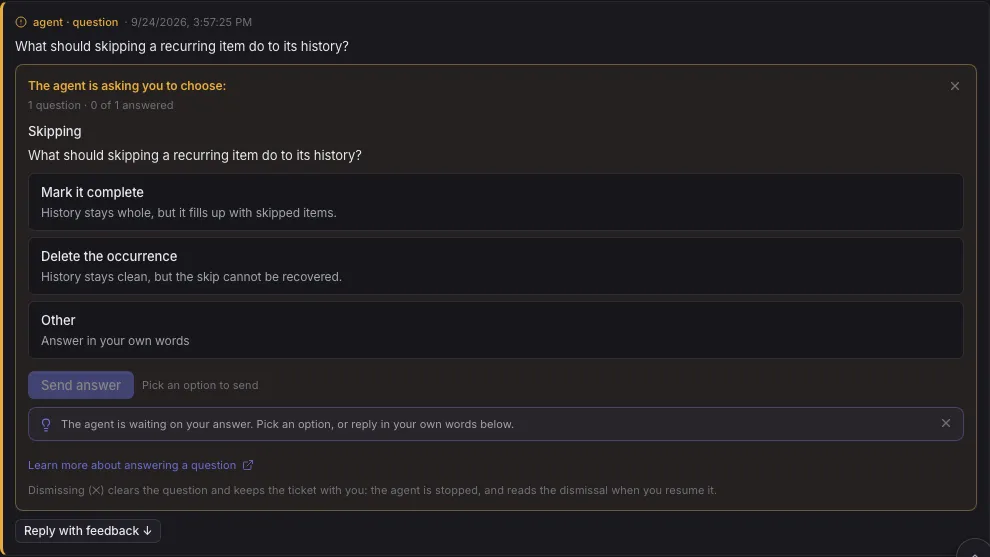
Result: the ticket goes back to the agent, which writes a Python .gitignore. The other two
agents never stopped: a parked ticket holds nobody else up.
4. Merge in any order
Section titled “4. Merge in any order”The tickets finish in whatever order they finish, and each lands in In Review with its own Ready to merge banner. Merge them as they arrive:
- Open the first README ticket to reach In Review, click Merge, then Merge in Merge branch.
- Do the same for the
.gitignoreticket. It touches another file, so it merges cleanly. - Now merge the second README ticket the same way.
Result: the last merge hits a conflict: both branches appended to the end of README.md.
Instead of stopping, the board merges your base branch into the ticket’s branch and hands the
conflict to an agent. The card moves back to In Progress and Git integration reads
Auto-resolving conflict… while the agent keeps both sections. Once it commits the fix, the
ticket returns to In Review and the merge completes.
If an agent cannot resolve a conflict in two tries, the ticket parks for you instead: see Resolve a merge conflict.
5. Check the result
Section titled “5. Check the result”git log --oneline --graphcat README.mdThree merges are in your history, and the README has both new sections. Move the three tickets to Done.
You can
Section titled “You can”- Run several tickets at once on one repository, each on its own branch and worktree.
- See each agent’s worktree, and know your own checkout stays untouched.
- Answer an agent’s question from your phone while the others keep working.
- Merge tickets in any order.
- Let an agent resolve a merge conflict, and know where to look if it cannot.
- Split big work into subtickets lets an agent do this fan out for you.
- Answer what the board asks you covers every reason a ticket parks.
- Review and merge an agent’s work goes deeper into review, checks and undoing a merge.