
Hold agents to a quality bar
An agent that says it is done has not proved anything yet. Two things let the board check it for you: verification checks you agree with the agent for one ticket, and code quality rules that hold every agent on the board to the same bar. With both on, a ticket only reaches In Review once its checks pass.
Before you begin
Section titled “Before you begin”- A ticket that runs in a git repo. Scratch tickets have no code to check and skip the gate.
- The Developer and Maintainer profiles turn the code quality rules and the pre-merge gate on, with warn enforcement. Explorer leaves them off. See Choose a profile.
Verification checks
Section titled “Verification checks”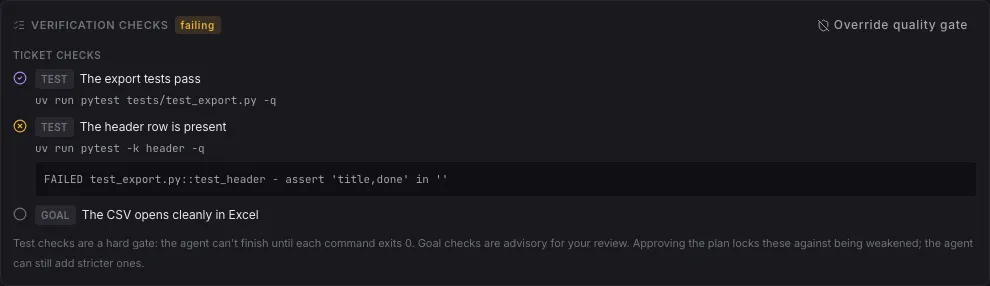
A verification check is one thing that must be true for the ticket to be done, in plain words, usually with a command that proves it.
| Kind | Has a command | What it does |
|---|---|---|
| Test | yes | A hard gate: the board runs the command in the ticket’s worktree, and it passes when the command exits 0. |
| Goal | no | Advisory, for your review. It is never run. |
Where they come from:
- On a plan ticket, the agent proposes its checks with the plan. They show in the plan card, under Verification checks. Read them before you click Accept plan: accepting locks them, so the agent can add stricter checks but cannot weaken or remove one without asking you first.
- On an Auto ticket, the agent declares its checks when it finishes. If it has commits but no checks, the board reminds it once.
- With the pre-merge gate on, the board adds its own check, Board gate, to every ticket (below). Agents cannot edit or drop it.
When they run: after the agent finishes, before the ticket rests in In Review. Test checks run one at a time, each for at most 10 minutes, and a commit that already passed is not checked again. The card on the board shows checking while they run.
What a failure does:
- The first two failures send the ticket back to To Do with the failing output, and the agent fixes it (attempt 1 of 3, 2 of 3).
- The third failure, or the same commit failing twice, parks the ticket in Pending Action for you: fix the work, agree different checks with the agent, or override the gate.
- A check that never finished (a timeout, a command that could not start) parks the ticket without counting an attempt: the code was never judged, so it is not a failure.
Result: a ticket in In Review shows passed on its Verification checks, or the reason it stopped. You can still merge while a check fails: checks gate the agent, not you.
Turn on the code quality rules
Section titled “Turn on the code quality rules”-
Open Settings > Agents and scroll to Enforcement.
-
Turn on Enforce code quality.
-
Pick an Enforcement mode:
Mode What the agent gets advise (prompt only) The rules, in its instructions. Nothing checks them as it writes. warn (post-write feedback) After every file it writes, the violations in that file, which it then fixes. block (deny the write until clean) The same check, returned as a refusal it must clear before it goes on. The file is already on disk: block makes the agent deal with it, it does not undo the write. -
Under Scope & thresholds, pick the Scope: changed files only (ratchet) holds agents to the bar on the files they touch, whole project everywhere. Global coverage minimum is the coverage floor any language without its own inherits.
-
Click Save changes.
Result: every agent on the board is held to the rules. The save-time check covers file length for every language, and for Python ruff plus the complexity rule; for TypeScript and JavaScript it runs eslint. The repo’s own ruff and eslint configuration applies.
Set the rules per language
Section titled “Set the rules per language”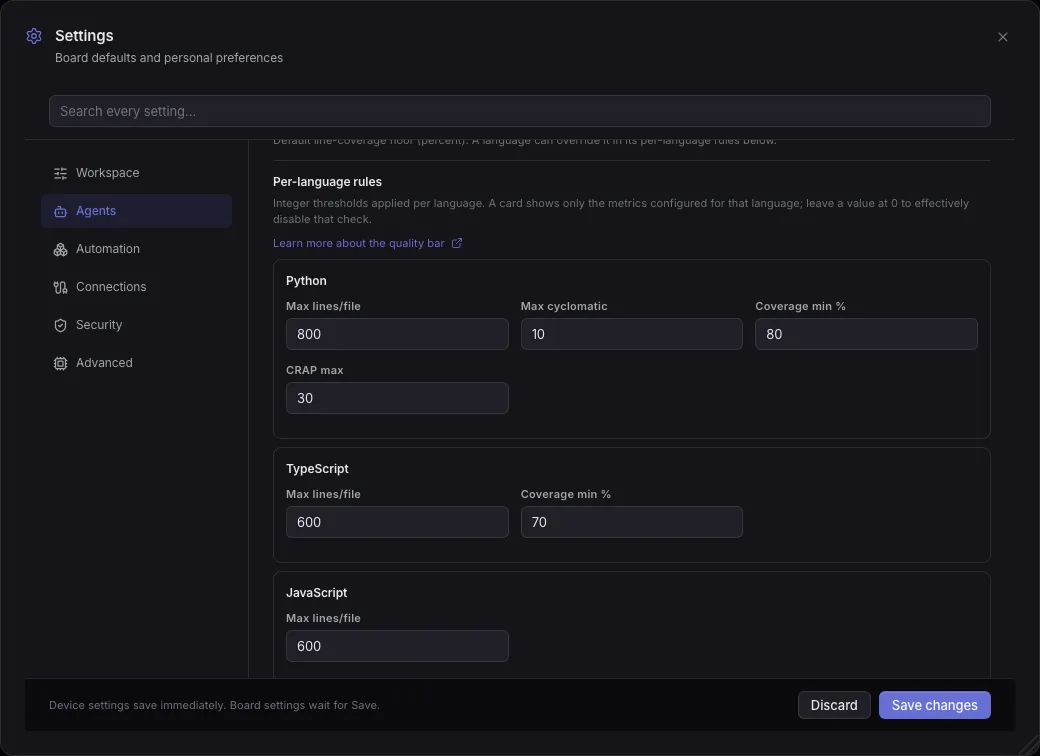
- In Settings > Agents > Per-language rules, edit the card of each language.
- Click Save changes.
| Language | Max lines/file | Max cyclomatic | Coverage min % | CRAP max |
|---|---|---|---|---|
| Python | 800 | 10 | 80 | 30 |
| TypeScript | 600 | 70 | ||
| JavaScript | 600 | |||
| Shell | 200 | |||
| CSS | 600 |
When each is checked:
- Max lines/file: whenever a file is saved.
- Max cyclomatic (Python): when a file is saved, and at the gate for a function the change pushes over it.
- Coverage min % (Python and TypeScript): at the gate, over the files the change adds.
- CRAP max (Python, complexity against coverage): at the gate only.
A limit of 0 turns that check off, both when files are saved and at the pre-merge gate, and agents are not told about it. A Global coverage minimum of 0 does the same for every language without its own coverage limit.
Result: agents are told these limits in their instructions, and the gate grades against them.
The pre-merge gate and the ratchet
Section titled “The pre-merge gate and the ratchet”The pre-merge gate is a verification check the board adds to every ticket, so a ticket cannot reach In Review while the rules are red.
- In Settings > Agents > Pre-merge gate, turn on Pre-merge gate (it needs Enforce code quality on).
- Leave Gate judging mode on ratchet unless you want every function graded.
- Click Save changes.
Result: from the next implementation run, each ticket carries a Board gate check. It runs with the other checks and fails the same way, sending the agent back to fix what it made worse. Plan runs, Loops, chats and scratch tickets do not get it.
How the gate judges a change:
- ratchet (the default) charges only what the change makes worse: a function the diff touches that is new, or more complex than on the base branch. A function that was already over the limit before stays grandfathered, so an edit to a legacy file can still land. Coverage is measured over the files the change adds, not the whole project, and test files are never graded.
- absolute grades every function in every file in scope against the raw limit.
A collector that runs out of time (7 minutes) is a warning, not a failure, and Gate test workers sets how many parallel test workers its coverage run uses.
To run the same gate yourself, from the repo:
rev0 quality-gateIt prints Code Quality gate passed: no violations. or Code Quality gate FAILED with one line per violation, and exits 1 on a violation. It reads the board’s global settings, not a board’s overrides.
Override the gate on one ticket
Section titled “Override the gate on one ticket”When the gate is wrong for one ticket (a generated file, a vendored module):
- In the ticket’s Verification checks, click Override quality gate.
- Confirm Override gate.
Result: the board gate stops running on that ticket until you click Re-enable quality gate. It is recorded as an override, not as a pass, and the ticket’s own checks still run. A check in progress can also be stopped with Cancel check.
To change the bar for one board, open its Board settings and, under Per-board overrides, Add an override… for Enforce code quality, Enforcement mode, Pre-merge gate, Scope or Global coverage minimum. The per-language rules apply to every board.
If something goes wrong
Section titled “If something goes wrong”Verification still failing after 3 attempts
Section titled “Verification still failing after 3 attempts”The agent could not make a test check pass. Read the output under the failing check, then reply with a hint and click Resume → To Do, ask the agent to change the checks (it needs your approval to weaken one), or override the gate.
The verification checks did not finish
Section titled “The verification checks did not finish”A check timed out or could not start, so the code was never judged. Often the command needs a tool the worktree lacks. Fix the command or the environment and move the ticket back to To Do.
Quality gate reports 0% coverage
Section titled “Quality gate reports 0% coverage”The gate measures coverage with the board’s own test runner. In a repo with its own virtual environment, the tests may fail to import. See python coverage 0.0% is below the 80% floor.
Related
Section titled “Related”- Review and merge an agent’s work, for what you do once the checks pass.
- Review and annotate a plan, where you agree the checks.
- Settings, for every quality setting and its default.