
Run a Loop
A Loop is a ticket that runs a pipeline, on a schedule, when you click Run now, or when an event arrives. The pipeline is a graph of steps (agents, child tickets, gates, commands) that you see and edit before anything runs. Each time it fires, the Loop starts a run: a ticket of its own, listed in the Loop’s history.
For when a Loop is worth it at all, see Which tool when; for every node type, see Loop nodes.
Before you begin
Section titled “Before you begin”- A working directory for the Loop if its steps touch code, as for any ticket.
Create a Loop
Section titled “Create a Loop”- Click Create and set Type to Loop (runs on a cron schedule).
- Set Schedule: Every day, Every X days, Specific weekdays or Specific hours, then the times (At) and the Timezone (your browser’s by default).
- Describe what each run should do in the description, as you would for a ticket.
- Click Create.
Result: the Loop is created and drafts its pipeline from your title and description. It fires on its schedule from then on. To create a Loop that runs only when you ask, uncheck Enabled in its Schedule tab once it exists.
A report from the Report library with Schedule makes a Loop the same way (Run a repo report).
Edit the pipeline
Section titled “Edit the pipeline”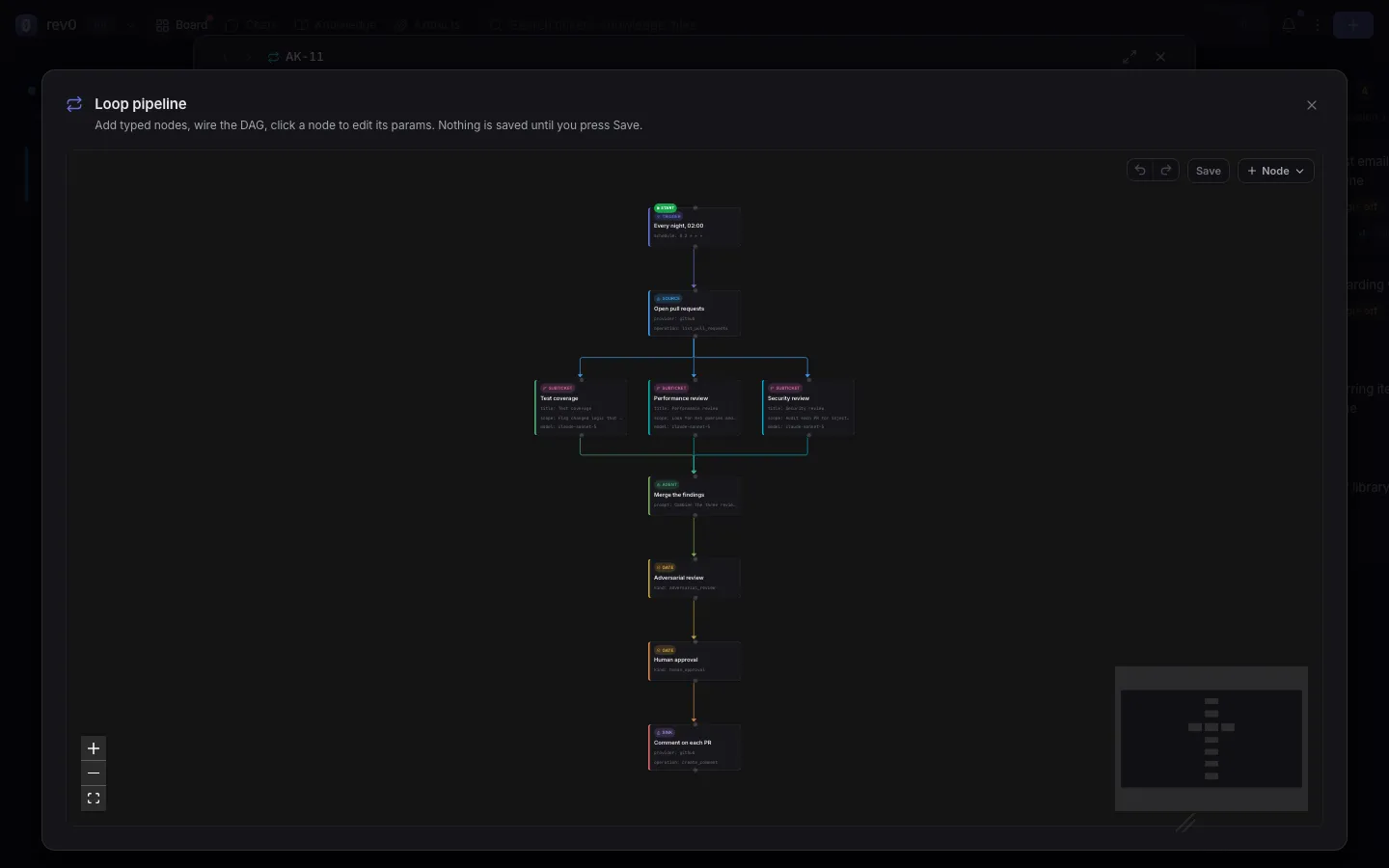
The Loop pipeline section shows on the Loop’s Schedule tab.
- Click Expand to open the full screen editor.
- Click + Node and pick a type. The node lands in the middle of the canvas.
- Drag from one node’s handle to another’s to wire them. Edges are the order: two nodes with no path between them run at the same time.
- Click a node to edit it: its Title, Type and Params (+ Add param… lists the params that type takes, required ones marked). The trash icon, or Backspace, deletes it.
- Click Save. Cancel puts the graph back as it was.
Result: the next run uses the saved graph. Save refuses a graph with a cycle; a graph that saves but cannot run yet shows Saved, but not runnable yet with the reasons.
Two other buttons redraw the whole graph from the description: Draft from intent on an empty pipeline and Regenerate on one that has nodes. Both replace what is there, and Clear deletes it.
Start from a template
Section titled “Start from a template”The board ships three pipeline templates: PR review (read-only by default), Jira
triage (human gated) and External intake (poll something and file the new items as
tickets). There is no template picker on the form yet: ask an agent, for example in a chat,
to “create a Loop from the pr-review template for owner/repo”. Its create_ticket tool
takes the template and its parameters.
Result: a Loop with the template’s pipeline, which you then edit like any other.
Run it now
Section titled “Run it now”- Open the Loop’s Schedule tab.
- Click Run now.
Result: a run starts straight away, whatever the schedule, even while the Loop is paused. If a run is still going, the board asks first: Run anyway starts a second one in parallel.
Read the run history
Section titled “Read the run history”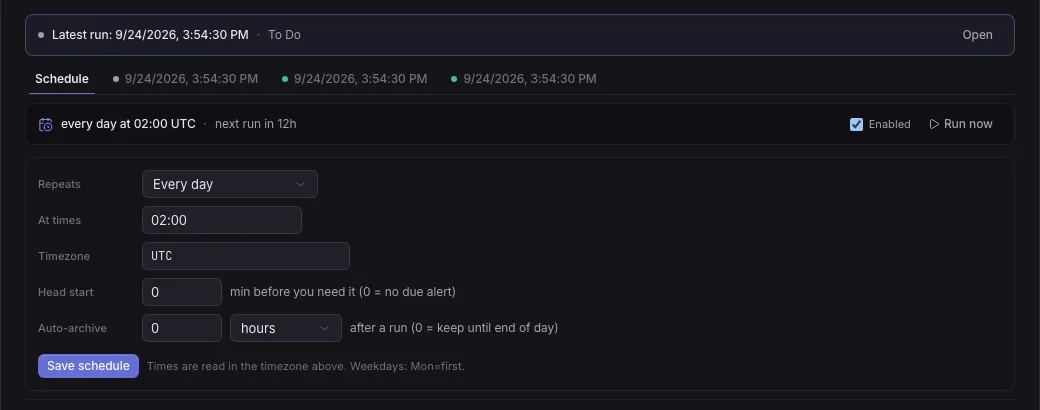
Each run has a tab next to Schedule, newest first, with a status dot and its date. The banner at the top links the latest one (Open). In a run’s tab:
- Pipeline progress draws the graph with each node’s state: done, running, approve, error or blocked.
- Result shows the report the run published, if it made one, and below it each node’s result and the run’s timeline.
- Open full run opens the run as a ticket, and Resume this run queues it again.
On the board, the Loop’s card sums it up: running, armed (waiting for its next time), paused, needs you, or how many runs are waiting on you.
Result: you see what every run did and which ones need you.
Approve a gate
Section titled “Approve a gate”A human_approval gate parks its run in Pending Action and the Loop’s card reads needs
you.
- Open the run (from the Loop’s history, or the card in Pending Action).
- Read the draft under Approval needed: and the gate’s title.
- Click Approve & continue, or Reject.
Result: approving resumes the run from the gate, without re-running the steps you reviewed. Rejecting ends the run there: nothing after the gate runs.
Head start and auto archive
Section titled “Head start and auto archive”Both are on the Loop’s Schedule tab; click Save schedule after changing them.
- Head start: the schedule’s times are when you need the result. With a head start of 30, each run starts 30 minutes earlier, and a due alert fires at the scheduled time. 0 means no head start and no alert.
- Auto-archive: how long after it fires a finished run leaves the board for the Loop’s history, in minutes, hours or days. 0 keeps it on the board until the end of its day.
The board-wide default is Archive finished Loop runs in Settings > Automation > Loops: immediately, end of its day (the default), never, or after an hour to 30 days. A Loop’s own Auto-archive overrides it. A run waiting on you (Pending Action or In Review) never leaves the board by itself.
Result: finished runs leave the board when you want, and stay in the Loop’s history.
Fire on an event instead of a clock
Section titled “Fire on an event instead of a clock”A trigger node can fire the Loop when something happens instead of (or as well as) at a time:
source | event | Fires when |
|---|---|---|
github | pr_opened | A pull request is opened. |
jira | assigned | An issue is assigned to you. |
ci | ci_failed | A CI run fails (webhook only). |
- In the pipeline editor, click the trigger node (or add one with + Node).
- Add its params with Add custom param:
kindset toevent, thensource,event,delivery(pollorwebhook) and, optionally, afilteronrepo,branch,author,assignee,projectorlabels(all must match). - Click Save. The Loop must stay Enabled: a paused Loop fires on nothing.
For example, to run on every pull request opened on one repo:
{ "kind": "event", "source": "github", "event": "pr_opened", "delivery": "poll", "filter": { "repo": "owner/repo" }}Polling needs nothing else: the board checks every 5 minutes (REV0_LOOP_POLL_INTERVAL).
A GitHub poll needs filter.repo.
Webhooks fire at once but need the board reachable from the sender and a secret to sign
with (REV0_WEBHOOK_SECRET, or the access token when that is unset). Each Loop gets its own
URL, /hooks/loop/<id>/<source>/<token>: ask an agent on the Loop for it, or read it from
GET /loops/<id>/triggers on the board’s API. GitHub deliveries must be signed with the same
token (the webhook’s Secret field on GitHub).
Result: each matching event starts one run; the same event never fires twice.
Let an agent orchestrate one
Section titled “Let an agent orchestrate one”An agent working a ticket can split independent strands of work into a Loop instead of doing it alone, when Agent orchestration is on (Split big work into subtickets). It creates the Loop as a subticket, writes the pipeline, fires one run and waits. Every child the pipeline dispatches branches off the orchestrator’s own branch; when they have all finished, the orchestrator merges and tests their work, so exactly one branch reaches you for review. The pipeline renders live on the orchestrating ticket while it runs.
When the graph ends on a kanban merge sink, every child’s work is already queued into
the branch that sink names (usually the orchestrator’s own); otherwise the orchestrator lands
each child itself. A human_approval gate in the graph parks the run until you approve it.
How a pipeline finishes on its own
Section titled “How a pipeline finishes on its own”- A child is finished when its checks are. Reaching In Review is not enough: the pipeline binds a child only once its verification checks have passed at its latest commit (or a human overrode them). A child sent back by a failing check is waited for.
- The hand-off is recorded, not guessed. A dispatched child passes its report to
finish_ticket, even on a board with final summaries off. That report is the step’s result; a later comment such as “fixed lint” does not replace it. - The reviewer reads everything. An
adversarial_reviewof subticket nodes gets an index of the children and pages through each one’s whole report, commits, diff and check results, read from the board when it runs. - A failed review goes to the orchestrator. When an agent awaits the Loop, a failed
review parks the run at the gate with its progress kept and wakes that agent with the
reviewer’s findings. It answers with
resolve_loop_gate:returnsends the reviewed children back with feedback and reviews their next landing,acceptpasses the gate,review_againre-runs the review on what the board holds now. With nobody awaiting, the run parks for you as before. - The pipeline says where its work lands. A
kanbanmergesink with"into": "orchestrator"(or a branch name) merges every child of the run there. It only runs if the pipeline reaches it, so a failed review lands nothing.
If something goes wrong
Section titled “If something goes wrong”A run is already in progress
Section titled “A run is already in progress”Run now found a run still going. Run anyway starts a second one in parallel; otherwise wait for the first to finish.
Can’t save
Section titled “Can’t save”The graph is not a DAG, or an edge points at a node that no longer exists. The banner says which. A trigger must have no inbound edge and a sink no outbound edge.
Couldn’t draft the Loop
Section titled “Couldn’t draft the Loop”Drafting a pipeline calls a model. Write a clearer description and try Draft from intent again, or build the graph with + Node.
webhooks are disabled
Section titled “webhooks are disabled”The board has no secret to sign webhook URLs with. Set REV0_WEBHOOK_SECRET (or an access
token) and restart the board.
Related
Section titled “Related”- Loop nodes, for every node type and its params.
- Run a Goal until it is done, for a Loop that runs until its objective is met.
- Loops and Goals, for when a Loop pays off.