
Settings
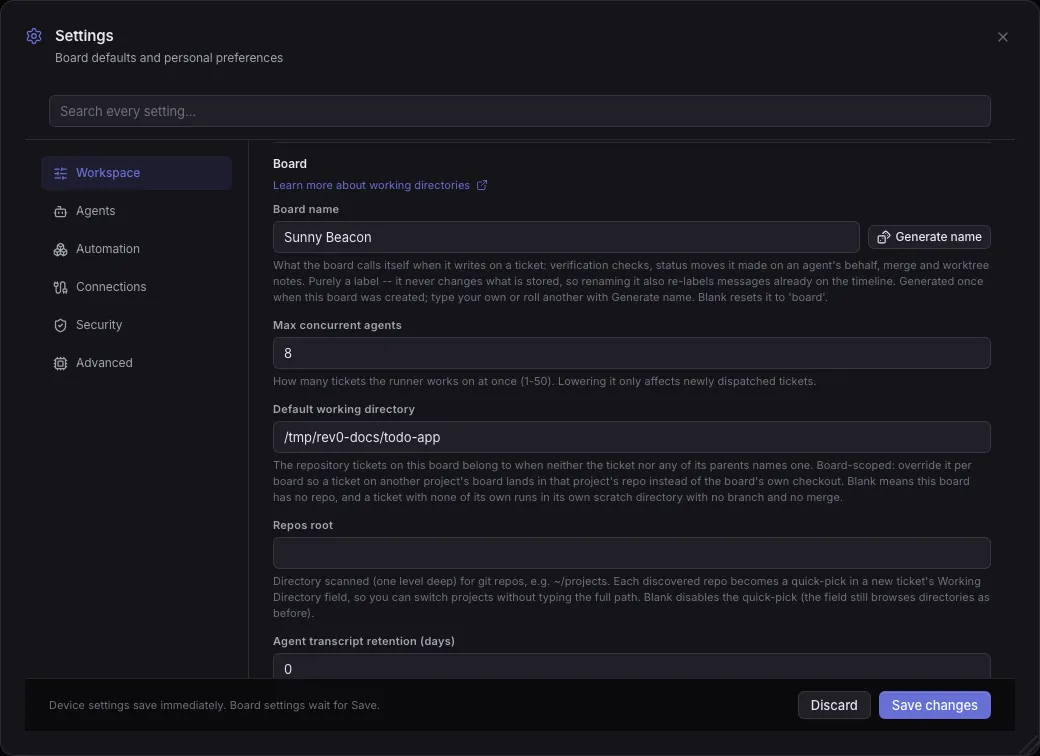
Open Settings from the header. The dialog has six categories, each a list of sections; the search box at the top matches every category at once. Settings marked as saved on this device apply the moment you change them; everything else waits for Save changes.
A setting with Yes under Board override can differ per board: open the board menu, choose Board settings…, and use Add an override…. A board without an override inherits the value set here.
Defaults are what a board has before setup runs. The setup wizard then writes a profile, so a board that went through it starts from those values instead.
Workspace
Section titled “Workspace”How the board looks, behaves, and notifies you.
Identity
Section titled “Identity”| Setting | What it does | Default | Board override |
|---|---|---|---|
| Commit author name | Name every commit an agent makes is authored as. The harness enforces it: it is pinned into each ticket’s git worktree and used for the runner’s own commits/merges, and an agent cannot commit as someone else without your approval. Blank falls back to your global git identity, else rev0. | your global git user.name, else rev0 | Yes |
| Commit author email | Email every commit an agent makes is authored as (paired with the commit author name). Blank falls back to your global git identity, else rev0@local. | your global git user.email, else rev0@local | Yes |
| Your name | What agents call you when they write to you, and the name shown for your assigned tickets. Blank (the default) addresses and labels you impersonally. A first name is enough. | blank | Yes |
| Write for someone who does not code | Agents use plain words (no file names, commands or technical terms), ask for a missing detail instead of leaving a placeholder for you to edit, and end every result with numbered steps you can follow. Off by default; the Explorer profile turns it on. | Off | Yes |
| Setting | What it does | Default | Board override |
|---|---|---|---|
| Runner name | The name rev0’s behind-the-scenes runner signs its notes with: verification checks, status moves it made on an agent’s behalf, merge and worktree notes. This is not the board’s own name, which you change from the board switcher. Purely a label, it never changes what is stored, so renaming it also re-labels messages already on the timeline. Generated once when this board was created; type your own or roll another with Generate name. Blank resets it to ‘board’. | a generated name | Yes |
| Max concurrent agents | How many tickets the runner works on at once (1-50). Lowering it only affects newly dispatched tickets. | 3 | No |
| Default working directory | The repository tickets on this board belong to when neither the ticket nor any of its parents names one. Board-scoped: override it per board so a ticket on another project’s board lands in that project’s repo instead of the board’s own checkout. Blank means this board has no repo, and a ticket with none of its own runs in its own scratch directory with no branch and no merge. | blank | Yes |
| Repos root | Directory scanned (one level deep) for git repos, e.g. ~/projects. Each discovered repo becomes a quick-pick in a new ticket’s Working Directory field, so you can switch projects without typing the full path. Blank disables the quick-pick (the field still browses directories as before). | blank | No |
| Agent transcript retention (days) | Delete the raw agent transcript of FINISHED tickets once it is this old, so the database stops growing without bound. Comments, plans and status history are never deleted. 0 keeps everything forever. | 0 | No |
New ticket defaults
Section titled “New ticket defaults”| Setting | What it does | Default | Board override |
|---|---|---|---|
| Default mode for new tickets | What the Mode select opens on when you create a ticket or add a subtask. Pick a plan mode to have new tickets wait for your sign-off by default. Epics, Loops and Goals always run in Auto. | Auto (agent executes freely) | Yes |
| Default column for new tickets | Where a ticket you create lands. Backlog parks it until you move it; To Do queues it for an agent straight away. Loops and Goals always land in To Do. | To Do (queued for the agent) | Yes |
| After a merge | What happens to a ticket’s worktree once its branch is merged. Ask shows a Clean workspace prompt on the ticket; instantly cleans it at merge time (the branch stays, uncommitted files block it); after N days leaves it to the idle days setting below. The Clean workspace button works under every option. | ask (show a Clean prompt on the merged ticket) | No |
| Clean idle workspaces after (days) | Clean a ticket’s workspace once the ticket has been idle this long, with the same rules as Clean selected: merged, committed worktrees are removed, and scratch folders lose only build output, environments and pushed clones. Checked at startup and every six hours. 0 never cleans automatically. | 0 | No |
Appearance
Section titled “Appearance”Theme (System, Dark or Light), Scroll the board sideways with the mouse wheel, Flow plan arrow-navigation zoom, and Help links (how long the Learn more links under panels, forms and settings stay: Always, A few times, The first time only or Never). Saved on this device the moment you change them. See Choose how long help links stay.
Mute notification kinds
Section titled “Mute notification kinds”A muted kind creates no notification at all: no bell entry, no desktop notification, no Slack post. Progress is muted by default. See notifications.
Browser notifications
Section titled “Browser notifications”Enable notifications on this device turns on OS notifications for what needs you, even with the board closed. Saved on this device. See notifications.
Board address
Section titled “Board address”Read only: every address the board answers on, each with a copy button. See phone access.
Keyboard navigation
Section titled “Keyboard navigation”Keyboard navigation mode (move a focus ring between cards), then one section per shortcut category where you Record new keys. Saved on this device. See Keyboard shortcuts.
Agents
Section titled “Agents”Defaults that shape every agent run.
Agent and model defaults
Section titled “Agent and model defaults”Default model (the model a ticket runs with when it names none), then one auth section per engine. The sections below follow, then the Intent triggers table behind Suggest intents while writing and a read-only table of which engine reaches each installed skill. See other engines.
Claude auth
Section titled “Claude auth”Sign in (or Re-authenticate) signs the Claude CLI in again when its login expires, without opening a terminal. See other engines.
Codex auth
Section titled “Codex auth”Sign in (or Re-authenticate) signs the Codex CLI in again when its login expires, without opening a terminal. See other engines.
Cursor auth
Section titled “Cursor auth”Sign in (or Re-authenticate) signs the Cursor CLI in again when its login expires, without opening a terminal. See other engines.
Gemini auth
Section titled “Gemini auth”Shows whether the Antigravity CLI is signed in. Run agy in a terminal on this machine to sign in. See other engines.
Model & thinking
Section titled “Model & thinking”| Setting | What it does | Default | Board override |
|---|---|---|---|
| Default thinking level | Extended-thinking budget a ticket runs with when it has no per-ticket override. More thinking = deeper reasoning but slower and more tokens. ‘Default (no override)’ leaves Claude Code’s own thinking behaviour untouched. | Default (no override) | No |
| Thinking eval model | The model that rates each run’s task when a ticket’s thinking level is ‘auto’ and picks the level it runs on. Use the cheapest one you have: an alias (haiku) or a model id on any engine (gpt-5.6-luna). ‘off’ skips the rating, so auto runs on the CLI’s own default. | haiku | No |
| Auto-update the agent CLIs | Update the Claude Code, Codex and Cursor CLIs already installed on this machine, on boot and every few hours, and tell you in the bell when one moves to a new version. A CLI that is not installed is left alone. | On | No |
| Agent timezone | The timezone agents read and report every date and time in. Their prompt carries the current local time on every turn and their shell gets a matching TZ, so what the agent says and what date reports agree. Blank uses the server’s own zone; set an IANA name like Europe/Paris when the board runs somewhere else (a UTC container) than the people reading it. | blank | Yes |
| Default reply intent | What the composer’s Intent picker starts on, for every message you send an agent. Intent says what the agent may DO with the message: Instruct acts on it, Question answers it with the agent held read-only for that turn, Suggestion is its call, Correction makes it re-check a premise first. You can still change it per message. | Instruct: do it now | No |
| Default answer style | What the composer’s Answer picker starts on: the shape of answer you want back. Default adds no directive; Concise asks for no preamble; Explain asks for the reasoning; Options makes the agent put the decision to you as clickable choices instead of prose. | Default (no answer-shape directive) | No |
| Default operation scope | What the composer’s Scope picker starts on: what the agent may TOUCH, as opposed to what it may do with your message. Full is unrestricted. Local lets it edit, commit and report on the board but blocks everything that leaves this machine (git push, gh pr comment/review/create, outbound Slack/Notion/Gmail/Jira writes). Read-only blocks local writes and commits too. You can still change it per message. | Full: no restriction | No |
| Suggest intents while writing | While you type a reply, offer to switch the Intent when you finish a trigger: typing ’?’ offers Question, ‘maybe’ offers Suggestion. A small popup appears above what you just typed and Enter accepts it; Escape, or carrying on typing, dismisses it. Edit the triggers below. | On | No |
| Default plan type | The kind of plan agents produce when nothing names one: when they file a plan themselves, and the mode they give a ticket they create for you to sign off first. Interactive plan is an HTML page you annotate by element, Flow plan a behaviour graph, Plan a verbose markdown write-up. A ticket’s own mode always wins over this. | Interactive plan (visual) | Yes |
| Shift+Enter sends the reply | In the ticket composer, make Shift+Enter send the message like the chat app you are used to. Off, it inserts a line break and only Cmd/Ctrl+Enter sends. Cmd/Ctrl+Enter keeps working either way. | Off | No |
Orchestration
Section titled “Orchestration”| Setting | What it does | Default | Board override |
|---|---|---|---|
| Agent orchestration | Give planning / top-level agents the orchestrator playbook: default to a single agent, and fan work out into parallel subtickets only for independent, breadth-first strands. Off keeps every ticket a solo agent. | On | No |
| Orchestrator worker model | Model a fan-out subticket defaults to (cost tiering: cheap workers under a frontier orchestrator). Blank makes a fan-out child inherit the parent’s model instead. Shown when Agent orchestration is on. | sonnet | No |
| Max orchestration children | Advisory cap on how many parallel subtickets one orchestration fans out to, so a plan can’t silently explode into many agents. Shown when Agent orchestration is on. | 6 | No |
| Orchestrator self-approval | Let an orchestrator review and approve (or correct) the PLANS of its own subtickets without a human, and wake it when a child’s plan is ready. Strictly scoped to the caller’s own subtree. Off keeps every child plan a human sign-off. Shown when Agent orchestration is on. | Off | No |
| Orchestrator permission delegation | Let an orchestrator resolve its own subtickets’ permission requests, so a fan-out where every strand needs the same tool costs one decision instead of N. It can only pass on a grant it ALREADY holds, or deny; anything else still goes to a human. Off keeps every child permission request a human click. Shown when Agent orchestration is on. | Off | No |
ponytail
Section titled “ponytail”| Setting | What it does | Default | Board override |
|---|---|---|---|
| ponytail (lazy senior dev mode) | Append ponytail’s lazy-senior-dev ruleset to the agent’s system prompt so it writes the smallest correct change: YAGNI, reuse what exists, stdlib and native features before new code or dependencies. Off by default. The rules ship bundled; uv run rev0 install-ponytail optionally pulls the canonical upstream copy (enabling here never installs it). | Off | Yes |
| ponytail intensity | How hard ponytail pushes: lite names the lazier option and lets you pick, full enforces the decision ladder (default), ultra is a YAGNI extremist that deletes before it adds. Shown when ponytail (lazy senior dev mode) is on. | full (enforce the ladder, default) | Yes |
Context & retries
Section titled “Context & retries”| Setting | What it does | Default | Board override |
|---|---|---|---|
| Proactive context compaction | Before resuming a long-running ticket, compact its session once it nears the model’s context window, so it keeps working instead of overflowing. | On | No |
| Compaction threshold | Compact when the session reaches this percentage of the model’s context window. Lower = compact sooner / more often; higher = compact later. Default 75%. Shown when Proactive context compaction is on. | 75% | No |
| Transient error retries | How many times the runner auto-retries a run that failed on a transient model/API error (socket closed, connection reset, timeout, 5xx, rate limit) before parking the ticket. Retries resume the saved session with exponential backoff. Usage/quota limits are NOT retried (they reset on an hours-long timescale, so an immediate retry is a waste) and park as before. 0 disables retrying (park immediately). Default 4. | 4 | No |
| Transient retry backoff base (s) | Base seconds for the exponential backoff between transient-error retries (wait ~= base * 2^attempt, with jitter). Default 2s. Shown when Transient error retries is on. | 2.0 | No |
| Transient retry backoff cap (s) | Upper bound on a single transient-error backoff wait, so the exponential growth can’t wedge the worker for too long. Default 30s. Shown when Transient error retries is on. | 30.0 | No |
| Stalled request timeout (s) | How long the runner waits on a silent agent CLI before treating the run as stalled and auto-retrying it as a transient error. Applies ONLY while the CLI is waiting on the model API, a long-running tool call (a build, a training job, a slow MCP call) is never interrupted, however long it takes. Guards against a dead streaming request wedging a worker slot forever, which eventually stops the board claiming anything. 0 disables it. Default 300s. | 300 | No |
Spend budgets
Section titled “Spend budgets”| Setting | What it does | Default | Board override |
|---|---|---|---|
| Enforce spend budgets | Check the board’s spend against the ceilings below before each agent turn, and park the ticket in Pending Action when one is exceeded. Off by default: the ceilings are visible as headroom in the usage pill either way, and turning enforcement on is what makes them bite. | Off | Yes |
| Daily budget (USD) | Ceiling on this board’s agent spend since 00:00 UTC. 0 disables the daily ceiling. The default is a runaway backstop, well above a normal working day. Shown when Enforce spend budgets is on. | 400.0 | Yes |
| Weekly budget (USD) | Ceiling on spend since Monday 00:00 UTC. 0 disables the weekly ceiling. Shown when Enforce spend budgets is on. | 2000.0 | Yes |
| Monthly budget (USD) | Ceiling on spend since the 1st of the month (UTC). 0 disables it. Shown when Enforce spend budgets is on. | 6000.0 | Yes |
Repository rules
Section titled “Repository rules”Per repository: the branch name pattern, the subject of the commits the runner makes itself, and what reaches the base branch (as is, or with its fixup commits folded). See pointing the board at your code.
Enforcement
Section titled “Enforcement”| Setting | What it does | Default | Board override |
|---|---|---|---|
| Enforce code quality | Master switch. Off = agents write freely (today’s behaviour). On holds every agent to the per-language rules below via three seams: the rules are advised in the system prompt, a post-write hook corrects violations in-loop, and a pre-merge check can block a red ticket. Off on a fresh board; the Developer and Maintainer profiles turn it on. | Off | Yes |
| Enforcement mode | How hard the in-loop hook pushes. advise = rules in the prompt only. warn = post-write feedback the agent fixes. block = deny the write until it’s clean. Shown when Enforce code quality is on. | advise (prompt only) | Yes |
Pre-merge gate
Section titled “Pre-merge gate”| Setting | What it does | Default | Board override |
|---|---|---|---|
| Pre-merge gate | Auto-inject a coverage + CRAP + lint command check on every ticket, so it can’t reach In Review while the code-quality rules are red. Off on a fresh board; the Developer and Maintainer profiles turn it on. Shown when Enforce code quality is on. | Off | Yes |
| Gate judging mode | How the pre-merge gate judges a violation. ratchet (default) blocks only NEW or worsened-vs-main functions, grandfathering pre-existing debt in a touched file, so an edit to a legacy hotspot can still land. absolute grades every function in a scoped file against the raw threshold. Shown when Pre-merge gate is on. | ratchet (only new/worsened code blocks, default) | No |
| Gate test workers | How many parallel pytest-xdist workers the gate’s coverage run uses. Close to a linear speedup, so raise it on a bigger machine; set 1 to run serially. Measured on a 14-core box: 8 workers 30s, 12 workers 25s (the default). Note a board already running several agents wants some cores left over. Shown when Pre-merge gate is on. | 12 | No |
Scope & thresholds
Section titled “Scope & thresholds”| Setting | What it does | Default | Board override |
|---|---|---|---|
| Scope | Changed files only holds agents to the bar on new code without forcing a rewrite of legacy files (the ratchet). Whole project enforces everywhere. Shown when Enforce code quality is on. | changed files only (ratchet) | Yes |
| Global coverage minimum | Default line-coverage floor (percent). A language can override it in its per-language rules below. Shown when Enforce code quality is on. | 80 | Yes |
Per-language rules
Section titled “Per-language rules”Shown when Enforce code quality is on: the thresholds per language (lines per file, complexity, coverage and others). 0 turns a check off. See the quality bar.
Automation
Section titled “Automation”Optional ways to control and extend work.
Features
Section titled “Features”The optional board capabilities: every section from Board features to Debug below, and Public sharing.
Board features
Section titled “Board features”| Setting | What it does | Default | Board override |
|---|---|---|---|
| App Space | Show the App Space in the top bar: a gallery of reusable single-page tools you can launch and save from ticket artifacts. | On | No |
| Knowledge Base | Show the Knowledge Base app: a board <-> Knowledge switcher in the header that opens a centralized wiki of markdown pages and links, searchable by agents working your tickets. | On | No |
| Auto-approve Knowledge Base pages | Agent-proposed pages go live immediately instead of waiting in the Knowledge Base app’s Pending review list. They stay labelled as never human-reviewed. Off keeps every proposal queued for you. Shown when Knowledge Base is on. | On | Yes |
| Reusable UI kit | Steer agents to BUILD visual artifacts from the reusable Astryx component factory and previously-approved compositions (the ui-factory skill) instead of hand-writing markup, and to feed approved UI back into the Knowledge Base for reuse. Off lets agents write one-off HTML per ticket. | On | Yes |
| Subtask map explanations (LLM) | On a ticket’s Subtask Map, add an LLM-generated one-line purpose to each subticket and a relationship label to each arrow, so the tree explains what each subticket does and why. Off shows the plain graph. Nothing is generated until you click Explain on a ticket. | Off | No |
| Tokenmaxxing bar | Show a context-window usage bar on cards and in the ticket view. | Off | No |
| rtk token reduction | Rewrite safe shell commands such as git status to their rtk equivalent so rtk trims the command output before the model reads it, cutting tokens. Off by default. Install the binary once with uv run rev0 install-rtk; enabling here never installs it. | Off | No |
| Price on ticket cards | Show each ticket’s total agent run cost on its board card. | Off | No |
| Spend readout | Show what you have SPENT, in money, against the cost ceilings, in the desktop usage popover and the mobile overflow menu. On by default. This does not touch the Claude/Codex quota percentages; those have their own switch below, so reclaiming menu space need not cost you the rate-limit meters. | On | No |
| Claude/Codex usage meters | Show how close each harness is to its rate limit, as a percentage, the compact badge on the desktop header and the per-harness bars in the usage popover and the mobile overflow menu. On by default. Turning BOTH this and the spend readout off removes the usage control from the header entirely. | On | No |
| Agent final summary | Ask the agent to wrap up with a summary of what it did: the closing message it writes at the end of a turn, and the summary comment when it finishes a ticket. On by default. Off tells it not to, on every turn and in every mode, leaving the plan, the diff, the commits and the work log as the record; it still says what you could not find there, and a BLOCKED ticket still explains itself in full. | On | Yes |
| Collapse indented activity | The ticket timeline indents rows by importance: your messages and the agent’s stay flush left, decisions (permissions, artifacts, background jobs) indent one level, and machinery (status changes, history, the verification gate, the agent work log) indents two. Each level folds behind a one-line summary you can click. This picks which levels start folded: nothing (default), machinery only, or everything indented. Whatever you open or close by hand wins for the rest of the session. | Nothing (default) | No |
3D printing
Section titled “3D printing”| Setting | What it does | Default | Board override |
|---|---|---|---|
| Open 3D models in Bambu apps | Show per-artifact buttons on a 3D model: ‘Open in Bambu Studio’ (slice a raw .stl/.3mf/.step model) and ‘Send to printer’ (send a sliced *.gcode.3mf via Bambu Connect). The board runs locally and launches the desktop app with the file; nothing is launched until you click a button. | On | No |
| Slicer app | Which app ‘Open in Bambu Studio’ launches for a raw model. Defaults to “Bambu Studio”; set to “OrcaSlicer” or a full app path/name to repoint it. Shown when Open 3D models in Bambu apps is on. | Bambu Studio | No |
| Setting | What it does | Default | Board override |
|---|---|---|---|
| Loop script node sandbox | How a Loop ‘script’ node’s arbitrary Python is isolated. srt wraps it in Anthropic’s sandbox-runtime (OS-level filesystem + network isolation), falling back automatically to a hardened subprocess if srt/node isn’t installed. off runs in-process with no isolation, not recommended. | srt (OS sandbox: filesystem + network isolation, default) | No |
| Archive finished Loop runs | When a finished Loop Run leaves the board for its Loop’s History tab. ‘end of its day’ is the default; ‘immediately’ clears the board the moment a run finishes, which also means a run you just approved disappears at once. A Loop’s own auto-archive timer (Schedule tab) overrides this. | end of its day (default; a per-Loop auto-archive timer overrides) | No |
Agent containment
Section titled “Agent containment”| Setting | What it does | Default | Board override |
|---|---|---|---|
| Allow-list the agent’s environment | Build the environment of every process an agent spawns from an allow-list instead of handing it the board’s own. Agents keep PATH, HOME, the temp and locale vars, TLS/proxy settings, the venv pins and the engine’s own credential; the board’s API token, its Jira/Slack tokens and SSH_AUTH_SOCK are dropped. Off by default because an integration may legitimately read an inherited variable, check yours, then turn it on. | Off | No |
| Extra variables to pass through | Variable NAMES (comma-separated) to keep on top of the allow-list, for an integration that needs one, e.g. SSH_AUTH_SOCK for an agent that pushes over SSH, or GH_TOKEN for one that shells out to gh. Names only, never values. Shown when Allow-list the agent’s environment is on. | blank | No |
Automatic review lane
Section titled “Automatic review lane”| Setting | What it does | Default | Board override |
|---|---|---|---|
| Automatic review lane | What happens when a ticket reaches In Review. auto spawns a reviewer agent that grades what it finds P0/P1/P2 and posts the findings on the ticket. manual waits for the Request review button. off (what the setup wizard writes unless you ask for a reviewer) hides the lane. Findings never block a merge: they warn. | manual (spawn a reviewer on request) | Yes |
| Reviewer skill | The skill the auto-spawned reviewer runs. One reviewer by default; add another (e.g. /security-review) per ticket from the review banner. | /code-review | Yes |
| Auto-review rounds | How many times one ticket may auto-spawn a reviewer. Fixing findings sends the ticket back through In Review, so without a cap the lane never settles. 1 = review the first time only; 0 = never auto-spawn. | 1 | Yes |
| Reviewer model | Model the reviewer runs on. Leave blank to inherit the ticket’s model, useful to review on a stronger (or cheaper) model than the one that wrote the code. | blank | Yes |
| Move idle In Review tickets to Done | After this long with no activity, an In Review ticket whose work is already merged (or has nothing to merge) moves to Done. Unmerged branches, Loop Runs and strands a running orchestrator still has to review never move. Any comment restarts the clock. | off (default; In Review tickets wait for you) | Yes |
| Setting | What it does | Default | Board override |
|---|---|---|---|
| Debug tools | For people working on the board itself: adds a ‘Report issue’ button to the top of every ticket, which opens the create form prefilled with that ticket as context and a template for describing what went wrong, and adds a ‘Board & debug’ section to Settings > Advanced > Debug: version, branch, sync state, pull, push, restart and open on GitHub. | Off | No |
| Column page size | How many cards a board column renders before the rest are revealed a page at a time as you scroll toward the end. Lower is lighter on big columns; revealed cards stay mounted, so scrolling back up never re-renders them. Shown when Debug tools is on. | 50 | No |
Public sharing
Section titled “Public sharing”Allow sharing artifacts publicly adds a Share publicly button to each artifact; pick how links are reached and their default lifetime. See sharing a deliverable.
Voice control
Section titled “Voice control”Enable voice control, then Activation (push to talk or a wake word) and the push to talk key. Saved on this device. See voice.
Transcription
Section titled “Transcription”| Setting | What it does | Default | Board override |
|---|---|---|---|
| Speech-to-text model | The local model that transcribes your voice on the server. Whisper base is a fast default; larger models are more accurate but slower. The model downloads on first use. Kyutai/Parakeet are placeholders for a future update. | Whisper base - fast, EN + multilingual (default) | No |
| Speech-to-text language | Language spoken into the mic. English is the default; French is supported. Auto-detect lets Whisper guess per utterance (a little slower, can misfire on short commands). | English | No |
Autocorrect
Section titled “Autocorrect”Cleans up dictated text on this device before it lands in the field. See voice.
Custom voice commands
Section titled “Custom voice commands”Your own phrases, each mapped to a board action. See voice.
LLM fallback
Section titled “LLM fallback”Asks a model to read a spoken command no known phrase matches. Saved on this device. See voice.
Things you can say
Section titled “Things you can say”The built-in phrases, as examples. See voice.
Connections
Section titled “Connections”External systems, deliveries, and MCP servers.
Integrations
Section titled “Integrations”Everything from External plugins to Recent deliveries below. Jira, GitHub and Slack imports have no switch here: they turn on with their credentials. See integrations.
External plugins
Section titled “External plugins”The folders and repositories the board loads plugins from. See loading a plugin.
Built in browser
Section titled “Built in browser”| Setting | What it does | Default | Board override |
|---|---|---|---|
| Built in browser session | Give each ticket its own computer (a browser you can watch and take over to sign in, kept for the life of the ticket), use a fresh isolated browser per run, or explicitly share signed in Chrome tabs through the official Playwright MCP Bridge extension. | Per ticket computer | No |
| Share the computer’s sign-ins | Per board: every ticket on a board drives one shared browser, so you sign in once. Each ticket still only sees and drives its own tabs, but every agent in the scope acts with your signed in accounts, and signing out signs out all of them. Per ticket keeps each ticket’s browser to itself. | Per board | Yes |
| Trim computer caches | Keep each ticket’s browser to its logins: cap its cache, skip Chrome’s component and model downloads, and delete the caches it can rebuild when the computer stops. Off keeps full size profiles. | On | No |
Outbound webhooks
Section titled “Outbound webhooks”| Setting | What it does | Default | Board override |
|---|---|---|---|
| Outbound webhooks | POST board events to a URL you control. Off by default; nothing is sent until this is on AND a URL is set. | Off | No |
| Webhook URL | The https:// endpoint each enabled event is POSTed to as JSON. Shown when Outbound webhooks is on. | blank | No |
| Signing secret | Optional. When set, each POST carries X-Kanban-Signature: sha256=<hmac of the body>, so your receiver can verify the event came from this board. Shown when Outbound webhooks is on. | blank | No |
| Retries per event | Extra attempts after a failed delivery, with exponential backoff. Only timeouts, connection errors and 429/5xx are retried. Shown when Outbound webhooks is on. | 3 | No |
Outbound webhooks: events
Section titled “Outbound webhooks: events”| Setting | What it does | Default | Board override |
|---|---|---|---|
| Ticket created | POST the ticket.created event. Shown when Outbound webhooks is on. | On | No |
| Ticket status changed | Noisy: fires on every column move, including each step of an agent run. Shown when Outbound webhooks is on. | Off | No |
| Ticket edited | Noisy: fires on every title / description / priority / tag edit. Shown when Outbound webhooks is on. | Off | No |
| Plan submitted | POST the ticket.plan_submitted event. Shown when Outbound webhooks is on. | On | No |
| Permission requested | POST the ticket.permission_requested event. Shown when Outbound webhooks is on. | On | No |
| Branch merged | POST the ticket.merged event. Shown when Outbound webhooks is on. | On | No |
| Run failed | POST the run.failed event. Shown when Outbound webhooks is on. | On | No |
Agent Browser Extensions
Section titled “Agent Browser Extensions”Shown when Built in browser is one per ticket: Chrome extensions (a Web Store link or an unpacked folder) every ticket’s computer loads. See extensions on a ticket’s computer.
Connect existing Chrome
Section titled “Connect existing Chrome”Shown when agents use your own Chrome: the extension to install in it. See the ticket’s computer.
Recent deliveries
Section titled “Recent deliveries”Shown when outbound webhooks are on: the last 200 events the board tried to send, with the status code and the attempts. See integrations.
MCP servers
Section titled “MCP servers”Extra MCP servers every agent run gets on top of the board’s own, and the servers each engine already manages. See MCP servers.
Security
Section titled “Security”Who may sign in, and what commands and tools may do.
Access token
Section titled “Access token”Copies the token a browser or a phone signs in with. Hidden when the board runs without one. See Security.
Command permissions
Section titled “Command permissions”The shell commands agents may run without asking, and the ones never allowed. See Permission lists.
Built-in safe baseline
Section titled “Built-in safe baseline”Read only: the commands every board allows before your own lists. See Permission lists.
Tool & MCP permissions
Section titled “Tool & MCP permissions”The agent tools and MCP tools that run without asking. See Permission lists.
Advanced
Section titled “Advanced”Operational details used less often.
Updates
Section titled “Updates”The running and latest version, the update check, and Upgrade. See updating.
Run setup again reopens the wizard; finishing it applies a profile. See profiles.
Storage
Section titled “Storage”Scratch repositories and worktrees on every board, with their size, to clean up. See backups.
Shown when Debug tools is on (under Automation, in the Debug section above). See troubleshooting.
Emergency stop
Section titled “Emergency stop”Stops every run and background job and pauses the scheduler; re-arming is a separate click. See troubleshooting.
Board & debug
Section titled “Board & debug”The board’s version and branch against its remote, with Pull, Push and Restart server. See troubleshooting.
Profiles
Section titled “Profiles”The setup wizard asks you to pick a profile and writes its values as ordinary settings, once; you can change each of them here afterwards. Nothing is selected for you: the wizard waits for a pick. To apply one again, use Run setup again in Settings > Advanced > Setup.
| Setting | Explorer | Developer | Maintainer |
|---|---|---|---|
| Max concurrent agents | 8 | 8 | 8 |
| Default plan type | Interactive plan (visual) | Interactive plan (visual) | Interactive plan (visual) |
| Automatic review lane | off (no review lane) | off (no review lane) | off (no review lane) |
| Claude/Codex usage meters | On | On | On |
| Write for someone who does not code | On | Off | Off |
| Default mode for new tickets | Interactive plan (visual) | Auto (agent executes freely) | Auto (agent executes freely) |
| Agent orchestration | Off | On | On |
| Enforce code quality | Off | On | On |
| Pre-merge gate | Off | On | On |
| Debug tools | Off | Off | On |
| Collapse indented activity | Everything indented | Nothing (default) | Nothing (default) |
| Enforcement mode | advise (prompt only) | warn (post-write feedback) | warn (post-write feedback) |
The wizard’s own questions can also set Automatic review lane, Commit author email, Commit author name and Your name.