
How rev0 works
The problem it solves
Section titled “The problem it solves”A coding agent in a terminal works one task at a time, in your checkout, while you watch. Running several at once means juggling terminals and branches; leaving one alone means coming back to changes you never agreed to. rev0 puts every task on a card, gives each agent a branch of its own, and turns every point where the agent needs you (a plan, a question, a risky command, a review) into a place on the board you answer when you are ready, from any device.
How it works
Section titled “How it works”One FastAPI app is the source of truth: a REST API, the live board UI and an embedded SQLite database. A CLI, an MCP server and the runner sit on top of it. You write tickets; the runner hands each one to an agent CLI (Claude Code by default, or Codex or Cursor, chosen by the ticket’s model), and the board records everything the agent does.
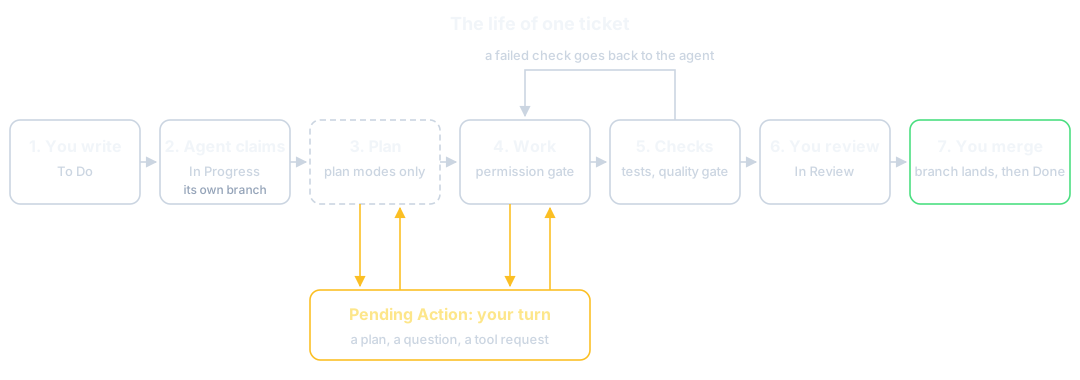
1. You write it
Section titled “1. You write it”A ticket names the outcome you want, the repository it happens in (its working directory) and a mode that says whether the agent may start implementing straight away. It lands in To Do, queued for an agent, or in Backlog if you park it. Tickets imported from GitHub, Jira or Slack land the same way, in the column you pick. See Write a ticket an agent can finish.
2. An agent claims it
Section titled “2. An agent claims it”The runner polls To Do and claims tickets, up to Max concurrent agents at once (8 after
setup), moving each to In Progress. For a ticket in a git repository it creates a branch,
agent/ticket-<id>, checked out in a worktree of its own, so agents working the same repository
never touch each other’s files, and nothing touches your base branch yet. A ticket that names no
repository runs in a scratch directory and delivers on the board. See
Point the board at your code and
Worktrees and branches.
The agent’s whole transcript streams onto the ticket’s timeline as it works, and you can reply to it mid run. See Follow and steer a running agent.
3. It plans, if you asked it to
Section titled “3. It plans, if you asked it to”In a plan mode the agent may not edit anything. It explores, writes a plan (as text, a behaviour graph or an interactive page), and stops in Pending Action for your sign off. You annotate it, send your notes back, or accept it; accepting switches the ticket to Auto and queues it again, and the agent implements what you agreed. See Review and annotate a plan and Plans you can point at.
4. It parks whenever it needs you
Section titled “4. It parks whenever it needs you”Pending Action is the one column that means “a human is needed”. A ticket lands there when the agent has a plan for you, a question it cannot answer from the code, a manual step it cannot take, a tool it is not allowed to use, or a budget it reached. The ticket stays parked until you answer, and the runner then resumes the same agent session with your answer, so nothing is lost. See Answer what the board asks you.
5. The permission gate checks each tool
Section titled “5. The permission gate checks each tool”On Claude Code and Codex, every tool and shell command the agent reaches for is checked before it runs. Pre-approved ones run; banned ones are refused outright; anything else parks the ticket with an approve or decline panel. That is what makes it reasonable to let an agent run shell commands on your machine. Cursor is the exception: its CLI has no approval channel, so its runs rely on Cursor’s own sandbox instead. See Approve a tool request and The permission gate.
6. The checks test the result
Section titled “6. The checks test the result”When the agent finishes, the board runs the ticket’s verification checks in its worktree: commands whose exit code decides pass or fail, such as the tests you agreed with the plan. With the Developer or Maintainer profile the code quality gate joins them, checking coverage, complexity and lint on what the change touched; with Explorer it is off.
A failed check sends the ticket back to the agent with the failure report, so the agent fixes the work rather than you. After a few failed attempts, or a second failure on an unchanged commit, the ticket parks for you instead. See Hold agents to a quality bar.
7. You review it
Section titled “7. You review it”A finished ticket moves to In Review, never straight to Done. It shows the branch’s diff, its commits, the check results and whatever the agent attached. You can comment on lines of the diff and send it back. A review agent can also read the diff and grade what it finds: it is off after setup unless you chose On request or Automatic in the wizard, and its banner shows only when it is on. See Review and merge an agent’s work.
8. You merge it, when you choose
Section titled “8. You merge it, when you choose”Merging is separate from finishing. Merge lands the branch in its base branch (or opens a GitHub pull request, if the ticket opted in) while the ticket stays in In Review, so you can try the change first. Moving the ticket to Done asks whether to merge. A merge conflict is handed to an agent to resolve on the branch before it reaches you. See Review and merge an agent’s work.
What you control
Section titled “What you control”- The profile you picked in the setup wizard sets the defaults: whether tickets plan first, whether agents may fan out, whether the quality gate holds. See Choose a profile.
- Each ticket’s mode, model and working directory, on the Create form.
- What agents may run without asking, in Settings > Security, and per board.
- How much they may spend, with spend budgets and a ticket’s spend limit. See Track usage and cap spend.
- When anything reaches your base branch: only when you merge.
Limits and trade-offs
Section titled “Limits and trade-offs”- The board runs agents on the machine it runs on, with your credentials. An open port is remote code execution, which is why a board reachable from the network refuses to start without an access token. See Security.
- Parallel agents on one repository cannot edit the same files at once, but they can still change the same lines on different branches. The second merge then meets a conflict, which an agent resolves on its branch.
- A ticket with no repository has nothing to merge: its result lives on the board.
Where you meet it on the board
Section titled “Where you meet it on the board”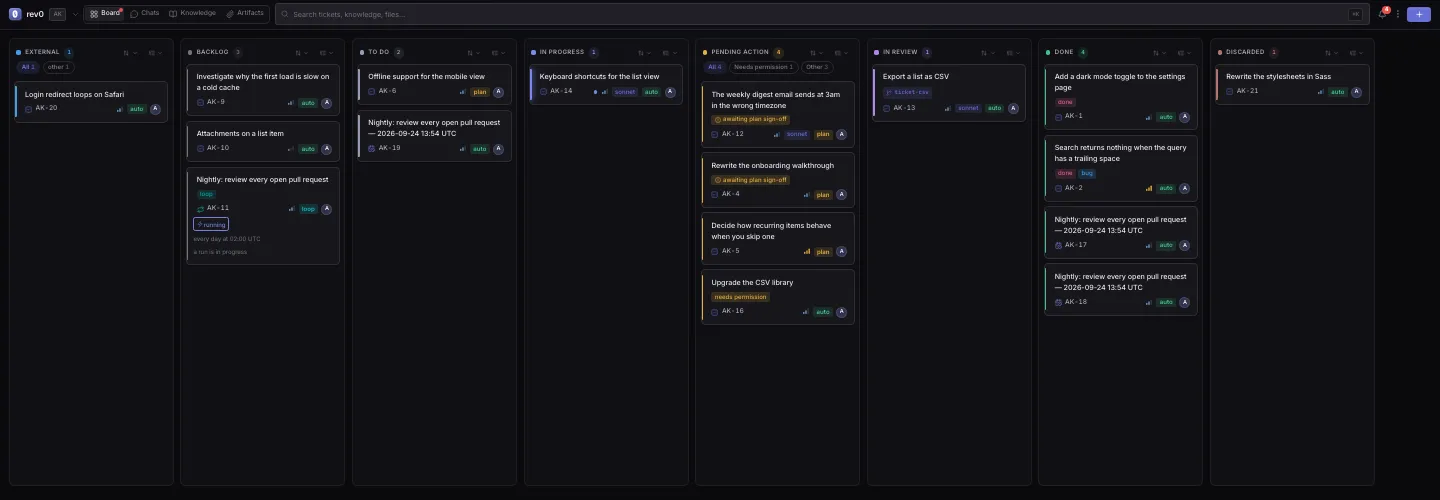
Each column is a stage of the diagram above: To Do is the queue, In Progress the agents at work, Pending Action your turn, In Review the finished work waiting for you, and Done the work you signed off.
Bigger work
Section titled “Bigger work”A ticket can have subtickets, and an agent can split broad work into a Loop: a pipeline of agents, gates and steps you approve before it runs. A Goal is a Loop that runs until an objective is met. The children’s work still reaches your base branch through one reviewed branch. See Split big work into subtickets and Loops and Goals.
Related
Section titled “Related”- Your first finished ticket, to walk this whole path once.
- Which tool when, to choose between a ticket, a Loop and a Goal.
- What an agent sees and can do, for runs, sessions and engines in detail.
- Columns, modes and tags, for every column, mode and ticket type.