
Review and merge an agent's work
When an agent finishes, its ticket moves to In Review and waits for you: the branch is not merged until you say so. This page takes you from reading the work to merging it, sending it back, or undoing a merge you regret.

Before you begin
Section titled “Before you begin”- A ticket in In Review that ran in a git repo. A ticket with no repo (a scratch ticket) has nothing to merge: its work is its artifacts and comments.
What In Review shows
Section titled “What In Review shows”Open the ticket. From the top, the parts that matter for a review:
| Part | What it tells you |
|---|---|
| Ready to merge banner | Which branch merges into which base. Commits lists what the merge will land, View branch details jumps to Git integration, and Merge merges. |
| Review banner | What the review agent found, when the review lane is on (below). |
| Artifacts | Files the agent produced: reports, screenshots, models, pages. |
| Git integration | The branch, its base, the worktree, the merge status, and the Merge, Revert and Request review buttons. |
| Verification | The checks the agent had to pass, and the board’s quality gate (Hold agents to a quality bar). On a ticket with a plan, they sit inside the plan instead. |
| Commits | Every commit on the branch, each with its own diff and stats. Click Show commits. |
| Architecture & changes | A diagram of what the change touches, coloured by added, modified and removed. Click Generate diagram: it is drawn from the branch diff on request, and Regenerate draws it again after new commits. |
| Branch diff & review | The whole branch diff, file by file, where you comment on lines. |
Result: you know what changed, what was checked, and what the agent left behind.
Comment on lines of the diff
Section titled “Comment on lines of the diff”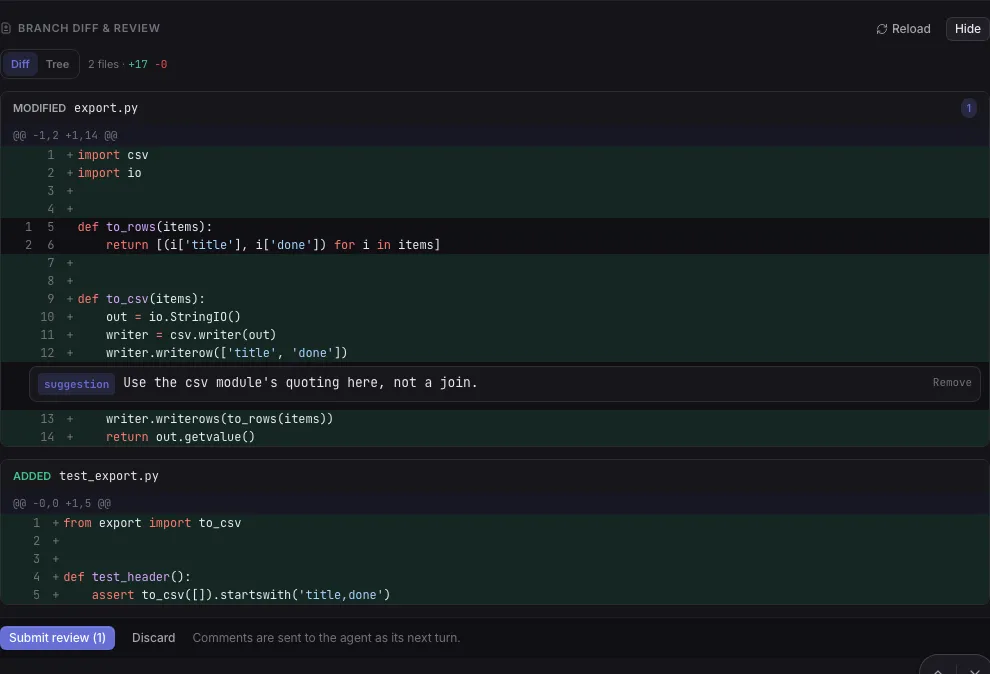
-
In Branch diff & review, click Review diff. Switch between Diff and Tree at the top.
-
Hover a line and click the comment icon (Comment on this line).
-
Pick a label. Labels follow Conventional Comments:
Label Use it for praiseSomething done well. nitpickA trivial, taste-based point. Non-blocking. suggestionA proposed improvement (the default). issueA specific problem. todoA small, necessary change. questionA concern that needs an answer. thoughtA non-blocking idea. choreA simple task to do. noteSomething to highlight. Non-blocking. Add a decoration if you want to be explicit: blocking, non-blocking or if-minor.
-
Write the comment and click Add comment. Repeat for other lines.
-
Click Submit review (N) in the bar at the bottom.
Result: the comments go to the agent as its next turn and the ticket moves to To Do (if the agent is still running, they are queued until it finishes). The agent must fix every blocking item and marks each comment resolved; the timeline shows the review with how many comments are still open.
Send the work back
Section titled “Send the work back”To send the agent back with a plain message instead:
- In the reply box at the bottom of the ticket, write what you want changed.
- Click Reply to agent.
Result: the ticket moves to To Do and the agent resumes its session with your message, on the same branch. Comment only posts without waking the agent. Move to moves the ticket to any column by hand.
The review agent
Section titled “The review agent”A review agent is a second agent that reads the branch diff and posts findings graded P0 (must fix before this lands), P1 (should fix) and P2 (nit). Findings never block a merge: they warn.
- Open Settings > Automation > Automatic review lane.
- Set Automatic review lane:
- off: no review agent, and no review banner. The setup wizard sets this unless you pick otherwise, because every review is an extra agent run.
- manual: a reviewer runs only when you ask for one.
- auto: a reviewer runs on every ticket that reaches In Review, after its verification checks pass. Auto-review rounds caps how many times.
- Pick the Reviewer skill (
/code-reviewor/security-review) and, if you want a different model from the ticket’s, the Reviewer model.
On a ticket:
- Request review in Git integration, or Review this branch in the review banner, starts a reviewer. It only runs on a branch that is ready to merge.
- Add a reviewer runs another one with a different skill.
- Fix from review sends the open findings to the ticket’s own agent, which fixes them on the same branch. You can also tick a finding off as resolved on its card in the timeline.
Result: the review banner shows Code review finished with how many findings are still open, and Show the full report lists them.
Merge the branch
Section titled “Merge the branch”- On a ticket in In Review, click Merge in the Ready to merge banner (or in Git integration).
- Confirm Merge branch.
Result: the branch merges into its base locally and the ticket stays in In Review, so you can try the change before you decide it is done. The worktree is kept, so you can reply to the agent and merge again.
Merge can ask first:
- A quality gate is still running: Merge without verifying stops the check and merges, Wait for verification queues the merge behind it.
- Review findings are still open: Merge anyway, or Show findings to read them.
Mark it Done
Section titled “Mark it Done”- On a ticket in In Review, click Approve → Done, or drag the card to Done, or use Move to.
- If the branch has work to land, choose:
- Merge & mark Done: merge, then move to Done.
- Mark Done without merging: finish the ticket and leave the branch unmerged.
- Cancel.
Result: the ticket is in Done. Its worktree is removed once it is Done; the branch stays.
Open a GitHub pull request instead
Section titled “Open a GitHub pull request instead”By default the board merges locally and never opens a pull request. To go through GitHub:
- On the Create ticket form, tick Open a GitHub PR when the branch is integrated.
- Optionally tick Auto-merge the GitHub PR without a review.
Result: when you click Merge, the board pushes the branch and opens a pull request (the
repo must have a GitHub origin and gh signed in). Git integration shows a Pull
request row with the link, and the card’s branch chip becomes PR # and the number. With
auto-merge on, the agent merges the PR itself; otherwise you review and merge it on GitHub. If
the pull request cannot be opened, the board falls back to a local merge. See
Bring in work from GitHub, Jira or Slack for importing issues.
Resolve a merge conflict
Section titled “Resolve a merge conflict”When the base branch moved and the merge conflicts, you do not have to do anything at first:
- The ticket moves to In Progress (resolving conflict…) and an agent merges the base into the branch and resolves the conflict, then the ticket returns to In Review and the merge runs again. It tries twice by default.
- If it still conflicts, the ticket parks in Pending Action with the conflicted files listed, and Git integration reads Needs attention. The branch and worktree are kept.
- Click Resume → To Do to have the agent resolve it and finish again, or reply with how you want it resolved first.
Result: the ticket returns to In Review with the conflict resolved on its branch; click Merge again.
Waiting to merge
Section titled “Waiting to merge”Waiting to merge means the base branch’s own checkout has uncommitted changes, so merging into it would not be safe. The board never stashes or overwrites them.
- Commit or discard the changes in the base checkout (the path in the Repository row of Git integration).
Result: the merge retries by itself on the next pass. After ten tries it parks the ticket in Pending Action with the files that are in the way.
Cancel a queued merge
Section titled “Cancel a queued merge”A merge or revert you asked for waits in a queue until the runner picks it up. To take it back:
- In Git integration, click Cancel queued merge (or Cancel queued revert).
- Confirm Cancel request.
Result: nothing is merged, the branch is untouched and Merge comes back. A request that never runs is rolled back by itself after ten minutes.
Merge again after the branch moved
Section titled “Merge again after the branch moved”After a merge you can keep working on the ticket: reply to the agent, and it commits more on the same branch. The status then reads Merged · new commits, the card gets a new commits chip, and the Ready to merge banner comes back.
- Click Merge again.
Result: only the new commits land.
Undo a merge
Section titled “Undo a merge”- On the merged ticket (still In Review), click Revert in Git integration.
- Confirm Revert merge.
Result: a revert commit on the base branch backs out every merge of this branch, and the ticket is unmerged again, so you can fix it and merge again. If the revert itself conflicts, nothing changes on the base and the ticket parks in Pending Action. A pull request merged on GitHub is reverted on GitHub, not here.
Move idle In Review tickets to Done
Section titled “Move idle In Review tickets to Done”- Open Settings > Automation > Automatic review lane.
- Set Move idle In Review tickets to Done to a delay, from after 1 day to after 30 days. It is off by default.
Result: a ticket with no activity for that long moves to Done, but only when its work is already merged or it has nothing to merge. Unmerged branches, Loop runs, plans waiting for you and children an orchestrator has not reviewed yet never move. Any comment restarts the clock.
If something goes wrong
Section titled “If something goes wrong”nothing to merge: the base already contains every commit on the branch
Section titled “nothing to merge: the base already contains every commit on the branch”The branch has nothing the base lacks: it was merged already, or the agent committed nothing. Merge is greyed out with the same reason. Reply to the agent if you expected changes.
The Merge button is missing
Section titled “The Merge button is missing”A merge or revert is already queued: cancel it (above), or wait. The ticket must also be in In Review, on a git repo, not a scratch ticket.
a reviewer only runs on work that is ready to merge
Section titled “a reviewer only runs on work that is ready to merge”Move the ticket to In Review first and let any merge or revert in flight finish.
Related
Section titled “Related”- Hold agents to a quality bar, for the checks that run before a ticket reaches you.
- Worktrees and branches, for where the branch lives and how to rename it.
- Answer what the board asks you, for a ticket parked on a conflict.