
Keep what agents learn
Keep what agents learn so the next run starts from it instead of rediscovering it: a build quirk, a convention, the one command that works. You end with a wiki your agents search before they guess, fed by pages they propose and you approve.
Before you begin
Section titled “Before you begin”The Knowledge Base is on by default. If Knowledge is missing from the header, turn on Knowledge Base in Settings > Automation > Board features.
Open the Knowledge Base
Section titled “Open the Knowledge Base”- In the header, click Knowledge (or press
3).
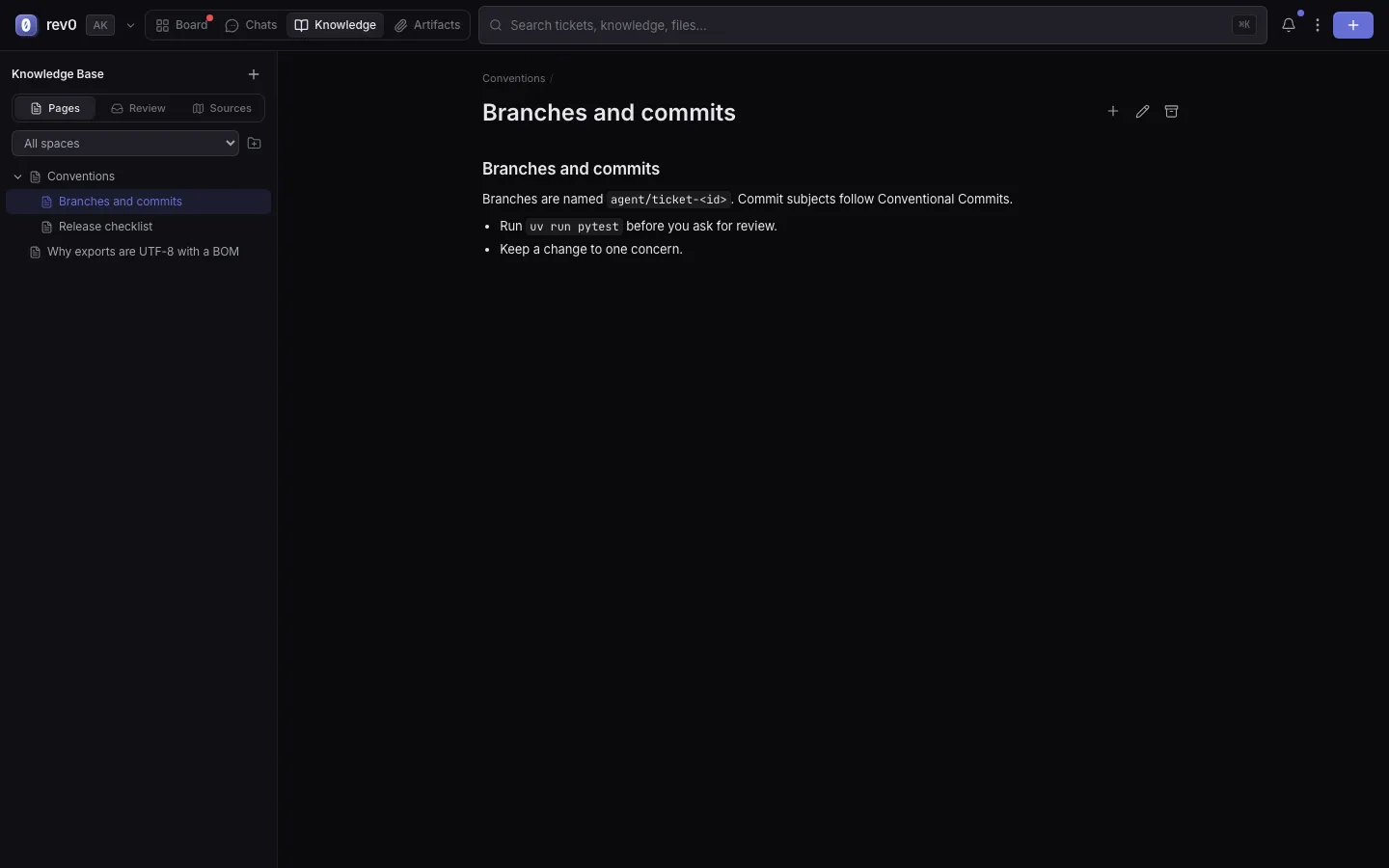
Result: the sidebar shows the Pages, Review and Sources tabs; the page you open reads on the right. To find a page by its words, use the search box in the header: its results have a Knowledge group.
Write a page
Section titled “Write a page”- In the sidebar, click + (New page).
- Fill in Title and Content (Markdown). For a link to knowledge that lives elsewhere, set Type to External link and fill in External URL instead.
- Pick a Space and, to nest it, a Parent page. Add Tags if they help.
- Click Create page.
Result: the page is live in the wiki, and agents find it from their next search. On an open page, the icons at the top add a subpage, edit it, or archive it.
Organize spaces, folders and pages
Section titled “Organize spaces, folders and pages”A space is a topic area (Frontend, Runbooks). Inside it, a top level page with pages under it acts as a folder: there is no separate folder object.
- To add a space, click the folder icon (New space) beside the space list, type a Space name and click Add.
- To show one space only, pick it in the list (All spaces shows everything).
- To nest a page, click Add subpage on its parent, or drag the page onto another page in the tree. Drag it to Move to top level to take it out again.
Result: pages sit in the space and folder a reader (and an agent filing a page) expects. A page with no space lives in General. Deleting a space keeps its pages and moves them to General.
Agents are told every space and folder when they start, so they can file what they propose in the right one. Folders that match how your team thinks are worth more than a big flat list.
Start from the starter spaces
Section titled “Start from the starter spaces”A new board has no spaces. For a code base, six starter spaces are a good start: Runner & Agents, Frontend, Backend & Data, Security & Permissions, Quality & Testing, and Runbooks. Create them with:
uv run rev0 seed-kb-spacesResult: the six spaces exist. The command does nothing when any space exists already, so rename or delete the ones that do not fit your project.
Review what agents propose
Section titled “Review what agents propose”Before an agent finishes a ticket, it weighs whether it learned something the next agent should not have to find again, and if so proposes one page, filed into a space and folder. By default the page goes live at once (see Publish agent pages without review); with that switched off, it waits for you.
- In the Knowledge Base, click Review. The number on it counts what waits.
- Open a page under Pending review. It shows which ticket it came from.
- Decide:
- Click Promote to wiki, pick the space (or Leave unfiled (General)), and confirm.
- Or click Delete page permanently to discard it.
- To take every pending page at once, click Promote all.
Result: promoted pages are live in the wiki; discarded ones are gone. Pages you archive yourself also land in Review, under Archived, so you can Restore them.
Publish agent pages without review
Section titled “Publish agent pages without review”Auto-approve Knowledge Base pages in Settings > Automation > Board features is on by default: agents’ pages go live at once, labelled “auto-approved, no human review”. Turn it off to have every page wait in Review for you. A board can override it, so a personal board can publish on arrival while a team board keeps its queue.
See where knowledge comes from
Section titled “See where knowledge comes from”- In the Knowledge Base, click Sources.
- Click a bubble for its status (Connected, Needs setup or Planned), how many tickets and pages came from it, and what setting it up takes. Import… opens that source’s import.
Result: you see every source feeding the board (Jira, Slack and GitHub today; Confluence, Notion and Hugging Face planned) and which ones still need credentials. Setting one up is in Bring in work from GitHub, Jira or Slack.
What an agent reads at the start of a run
Section titled “What an agent reads at the start of a run”On the first turn of a ticket, the agent gets:
- the titles of up to three pages that match the ticket’s title, with how to read them;
- every space and folder, for filing a page later;
- any page you attached to the ticket in Context (optional) on the Create form, by name.
It never gets page bodies pasted in. It reads a page, or searches for more, with the Knowledge Base tools, which it may always use without asking; it is told to search before it guesses at anything project specific. So a page earns its place by a title an agent would search for.
What goes where
Section titled “What goes where”| Put it in | When it is | For example |
|---|---|---|
| The Knowledge Base | Reusable knowledge for people and agents across tickets, that someone should review: a gotcha, a runbook, an architectural decision, a convention with its why. | “Frontend tests need npm ci in a fresh worktree”, a deploy runbook. |
The repository’s CLAUDE.md (or AGENTS.md) | A short rule every agent in that repository must follow on every run, versioned with the code it is about. | “Run tests with uv run pytest”, “never edit generated files”. |
| The ticket | What only this piece of work needs: the outcome, the acceptance, the links, the decisions made along the way. | “Rename the setting, keep the old key readable for a release”. |
A rule of thumb: if it would be wrong on another branch, it goes in CLAUDE.md; if it would
be useful on another ticket, it goes in the Knowledge Base; otherwise it stays on the
ticket.
If something goes wrong
Section titled “If something goes wrong”Knowledge is missing from the header
Section titled “Knowledge is missing from the header”The Knowledge Base is off. Turn on Knowledge Base in Settings > Automation > Board features and click Save changes.
Nothing waiting for review.
Section titled “Nothing waiting for review.”No agent proposed a page yet. Agents only propose one when a ticket taught them something durable, and a board with Auto-approve Knowledge Base pages on publishes them straight into the wiki instead.
Related
Section titled “Related”- Write a ticket an agent can finish, to attach a page as context.
- Find and reuse what agents made, for files rather than knowledge.
- Settings, for the Knowledge Base switches.