
Plans you can point at
The problem it solves
Section titled “The problem it solves”An agent in Auto makes every decision on its own and shows you the result. When it guessed right, that is the fastest path. When it guessed wrong about something early (which library, which layer, which of three designs) everything built on the guess is wrong too, and you find out in review, after the tokens and the time are spent. A reply at that point asks the agent to undo work, and a rewrite rarely comes out as clean as a first draft.
A plan moves that moment to the start. The agent reads the code and proposes; you correct the proposal where it is wrong, while it is still words.
How it works
Section titled “How it works”A ticket in a plan mode runs in two phases.
- Planning. The agent explores the code and writes a plan, then parks the ticket in Pending Action with the plan marked awaiting sign-off. For a text or flow plan it runs read only and has no worktree; for an interactive plan it gets a worktree to build the page in, but may not touch the product code yet.
- Building. Once you accept, the agent implements the plan with its full tools.
Between the two, you review. You do not have to rewrite the plan or describe where your comment applies: you select the exact words, block or element and annotate it (Comment, Replace, Delete or Explain). Send to agent delivers every open note pinned to what it points at, the agent revises, and the plan comes back as the next version. You go around as many times as it takes; each round costs one short planning run.
Three kinds of plan
Section titled “Three kinds of plan”| Plan | What you review | Fits |
|---|---|---|
| Plan (text) | A markdown write-up: the approach, the files, the steps, the risks. | Most engineering work: a refactor, a migration, a bug whose fix could go several ways. Quickest to read and to annotate line by line. |
| Flow plan | A graph of behaviour blocks (steps, decisions, loops, inputs and outputs) that you can edit directly, not only annotate. | Work that is a process: a pipeline, a state machine, a multi step flow with branches, where the order and the branches are the decision. |
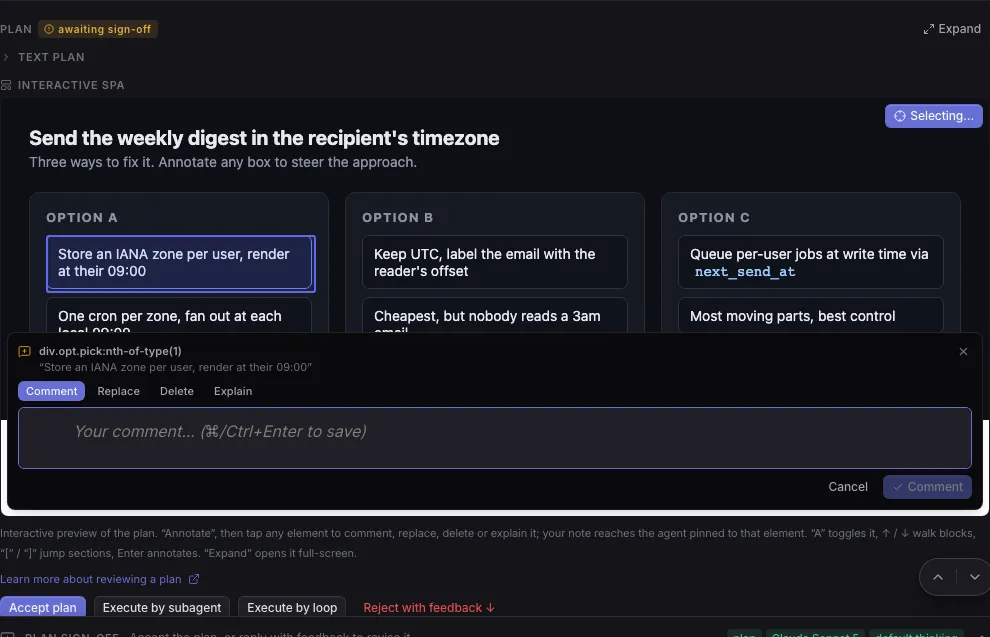
| Interactive plan | An interactive HTML page: mockups, options side by side, diagrams, a small proof of concept. You annotate any element. | Visual work and choices between options: a UI change, a layout, a design decision you would rather see than read about. |
The screenshot shows an interactive plan with three options side by side, one of them being annotated:
What accepting a plan changes
Section titled “What accepting a plan changes”When you click Accept plan:
- The ticket’s mode switches to Auto and it goes to To Do. The plan is agreed, so from now on the agent implements rather than iterates on the plan.
- The agent gets the approved plan in its instructions on every run, with the order to implement it end to end.
- The plan’s verification checks are locked against being weakened. The agent can still add stricter ones, but removing or loosening one now needs your permission.
- Notes you had not sent are not sent: accept only once they are addressed, or send them first.
If the agent files a new plan after you accepted (because it found something the plan did not cover), the approval is cleared, the agent stops and the ticket parks for your sign-off again. You never find an agent building a plan you did not see.
Execute by subagent and Execute by loop accept the plan too, but hand the building to a fresh child ticket (or an orchestrator that splits the work across several) with its own model, while this ticket waits.
What you control
Section titled “What you control”- The ticket’s mode, in the Create form or later from the reply box. See Pick a mode.
- Default mode for new tickets, in Settings > Workspace > New ticket defaults: set a plan type here to have every new ticket wait for your sign-off.
- Default plan type, in Settings > Agents: the kind of plan agents produce when nothing names one (when an agent files a plan on its own, or creates a ticket for you to sign off). Interactive plan by default. A ticket’s own mode always wins.
Limits and trade-offs
Section titled “Limits and trade-offs”- A plan costs a planning run and your review time. For a small, clear ticket, Auto is cheaper: the diff is the plan.
- A plan is the agent’s intention, not a proof. Review the diff all the same; the verification checks are what hold the agent to the parts that matter.
- Epics, Loops and Goals always run in Auto.
Where you meet it on the board
Section titled “Where you meet it on the board”- The Mode field of the Create form.
- A card in Pending Action marked awaiting plan sign-off.
- The Plan section of the ticket, with Accept plan, Execute by subagent, Execute by loop and Reject with feedback ↓, and the Send to agent bar.
- Catch up, where a plan can be accepted or rejected from its card.
Related
Section titled “Related”- Review and annotate a plan, step by step.
- Write a ticket an agent can finish, to need fewer rounds.
- Which tool when, to choose between a ticket, an Epic, a Loop and a Goal.